

Gallery
Artists, series and exhibitions
In a gallery each artist has a page and a CV. Series group the works, and exhibitions show where a work has been. A one-artist site has its CV on a page of its own.
Product Artworks
For artists and galleries. Every painting gets its own page, where visitors see it in 3D, on their own wall or in a drawn room. There is no cart: people ask about a painting or make an offer, and you answer.
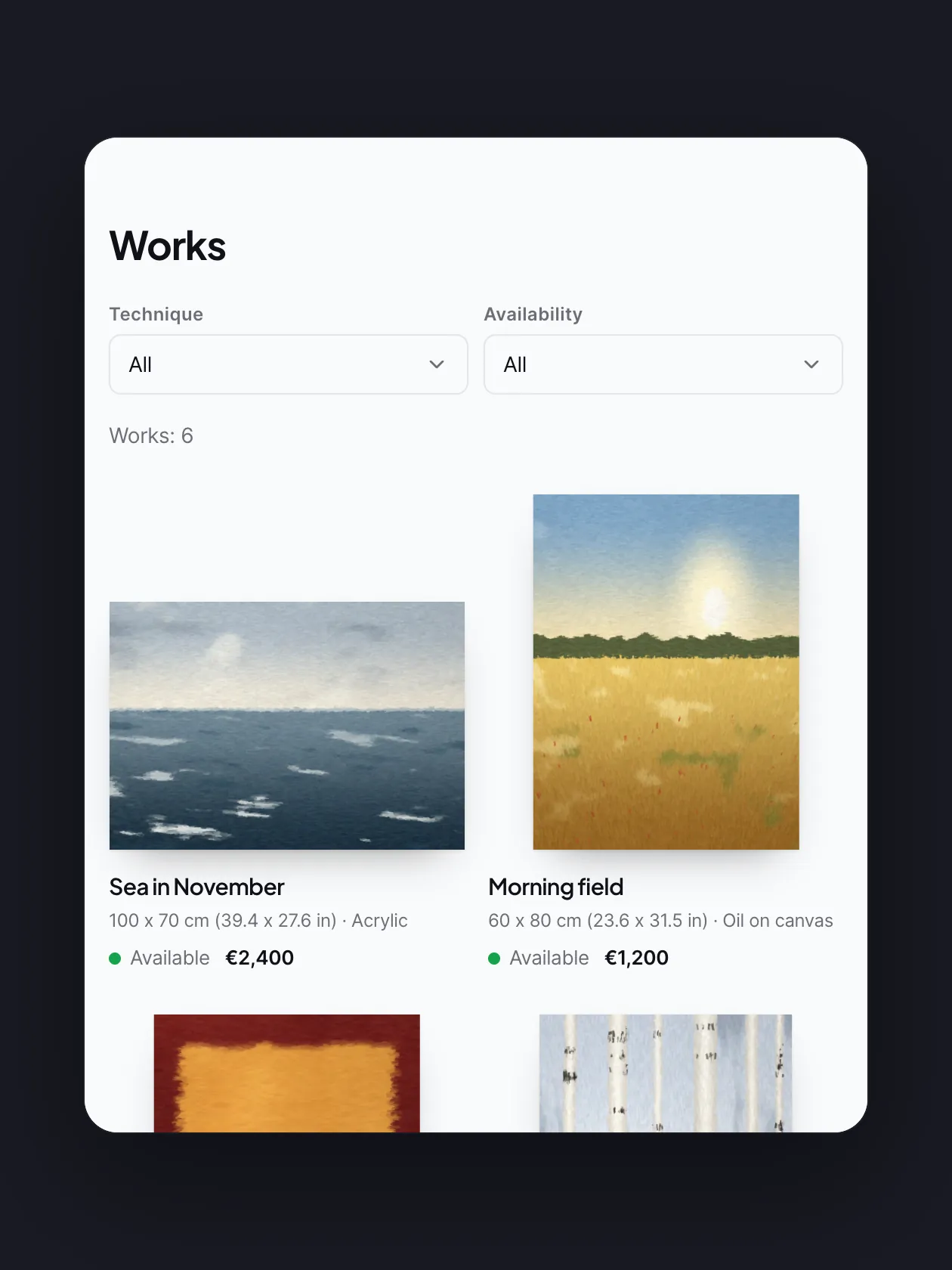
Each painting hangs at its real size, with its own depth, edge and frame. Pick the works that hang there, or leave them all. A switch can add a "View on your wall" button too.
Get startedSongs
An exhibition your visitors walk into
This is the real Gallery hall block. Keep scrolling and you walk through it. Click a painting to see it up close.
Every room has its own walls
You draw the hall's shape yourself. Each room has its own wall colour, floor, ceiling, light and frames.
This is the real Gallery hall block. Keep scrolling and you walk through it. Click a painting to see it up close.
You draw the hall's shape yourself. Each room has its own wall colour, floor, ceiling, light and frames.
The room designer
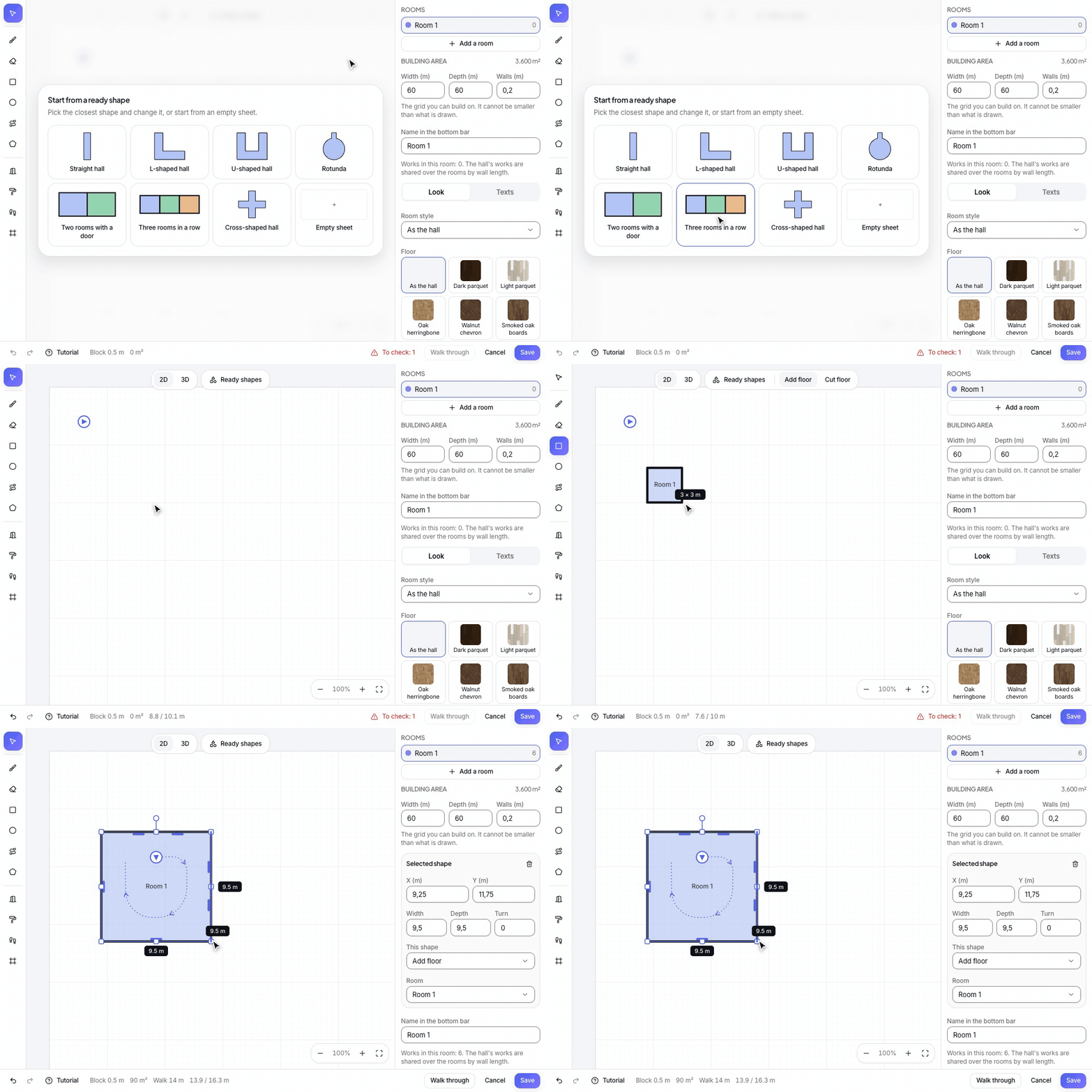
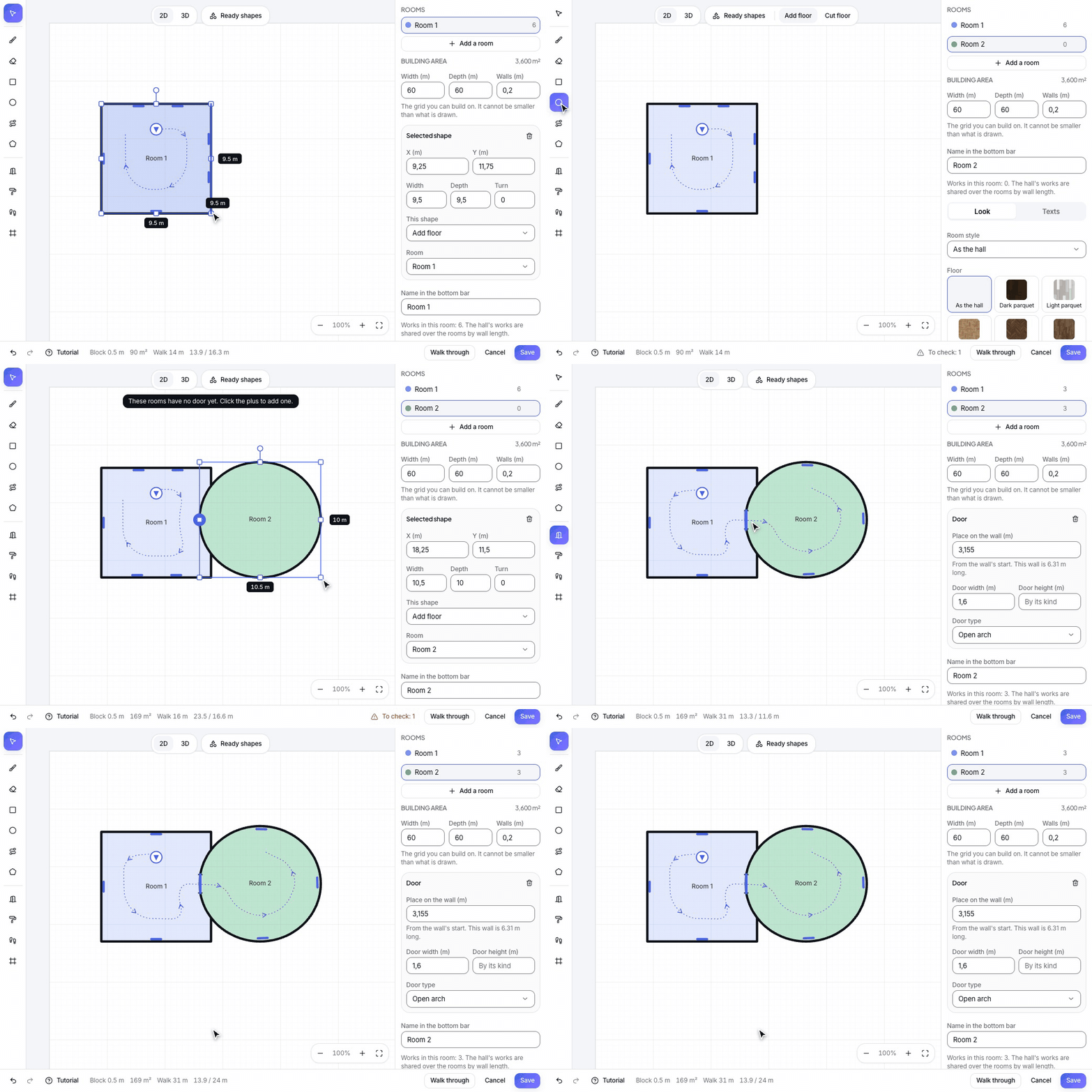
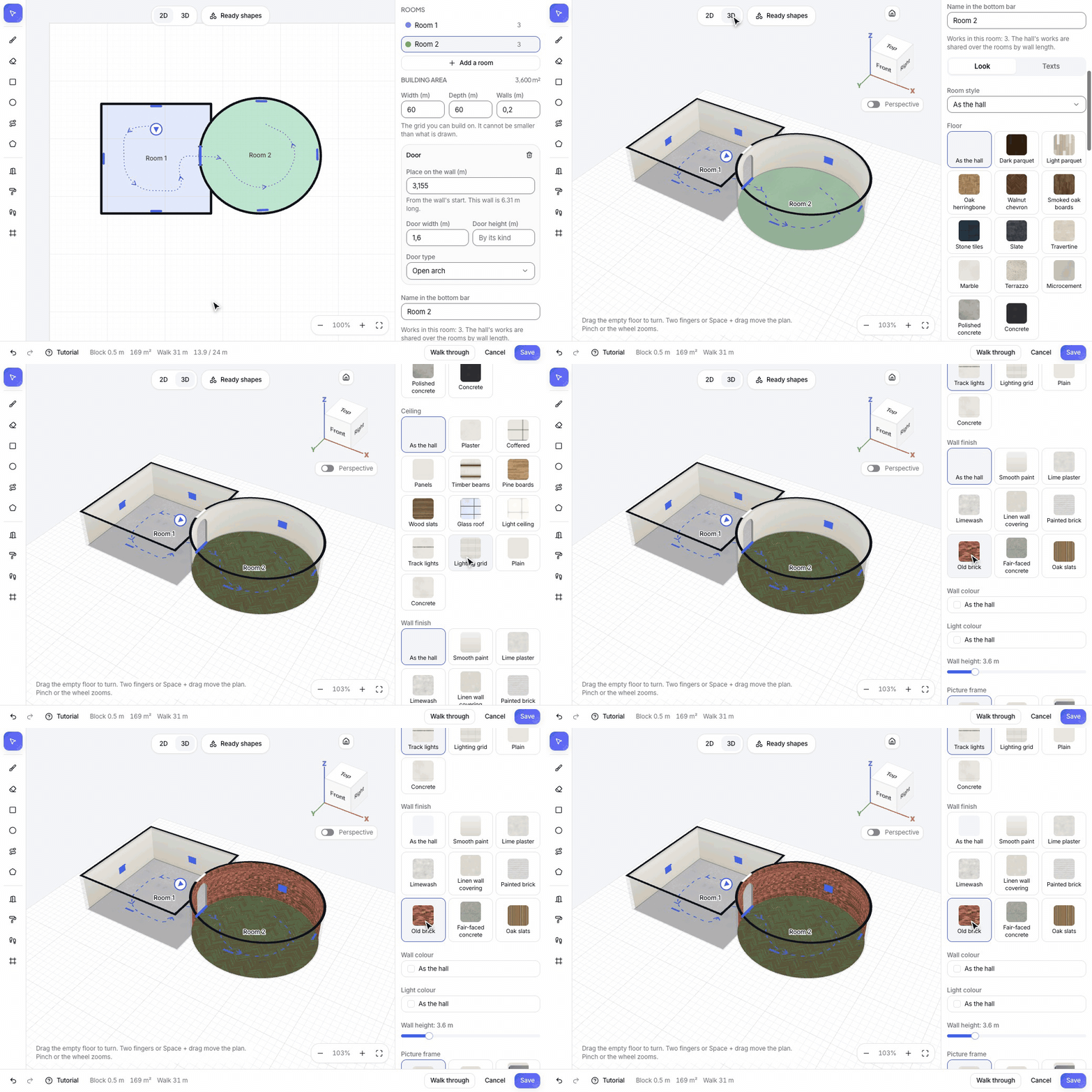
The shape of the hall comes from you. Four steps, and every painting already hangs in place on a wall.
Pick a ready shape or an empty sheet, and drag a rectangle. The size shows as you drag. Best: keep a room 7 to 10 metres wide, so the paintings stay close to the visitor.
Add a room, draw it against the first, and click the shared wall with the Door tool. Best: put the door in the middle of the wall, so the way through the hall is clear.
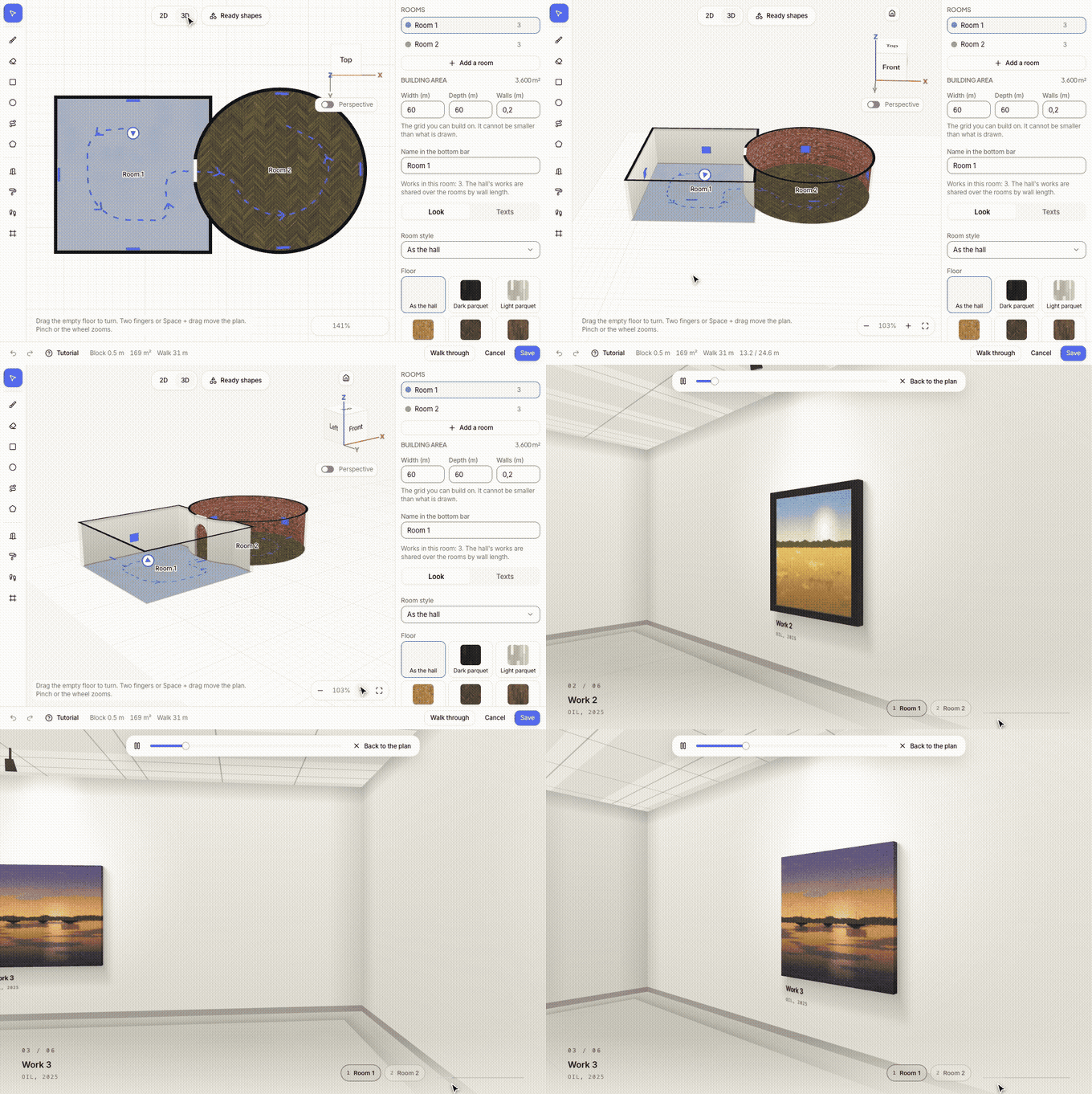
Pick each room's floor, ceiling, walls and light, and see the result in 3D at once. Best: change one strong thing per room, like a dark wall after a light room.
The Walk through button shows the hall through your visitor's eyes before you save. Best: leave the last wall free for your message and your button.
Your visitor's side
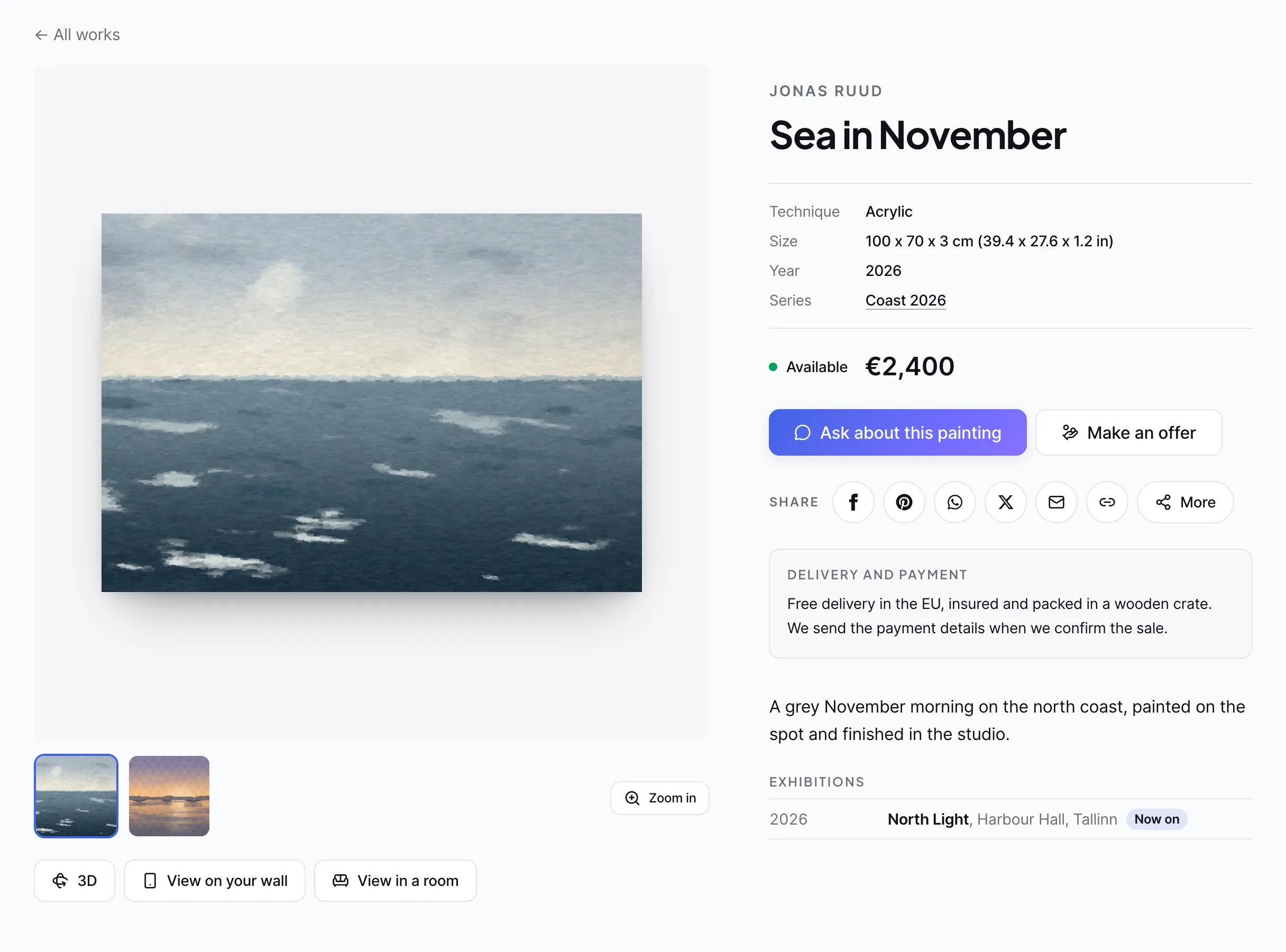
The photo and more photos, the artist, the technique, the size in centimetres or inches, the series and the price. Visitors ask about the painting or make an offer, and read your delivery and payment terms in the same place.
3D, the visitor's own wall through the phone camera, and a drawn room. They load only when pressed, so the page stays fast.
The photo opens on the whole screen, so the brush strokes show.
The work page shows where the work has been, with a mark while a show is on now.
View in a room
Try it here. On a phone, "View on your wall" opens the camera and the painting appears on the wall at its real size. On a computer the same button shows a QR code. "My wall" puts the painting on a photo of the visitor's own wall.
Painting
Room
Wall colour
Add a work
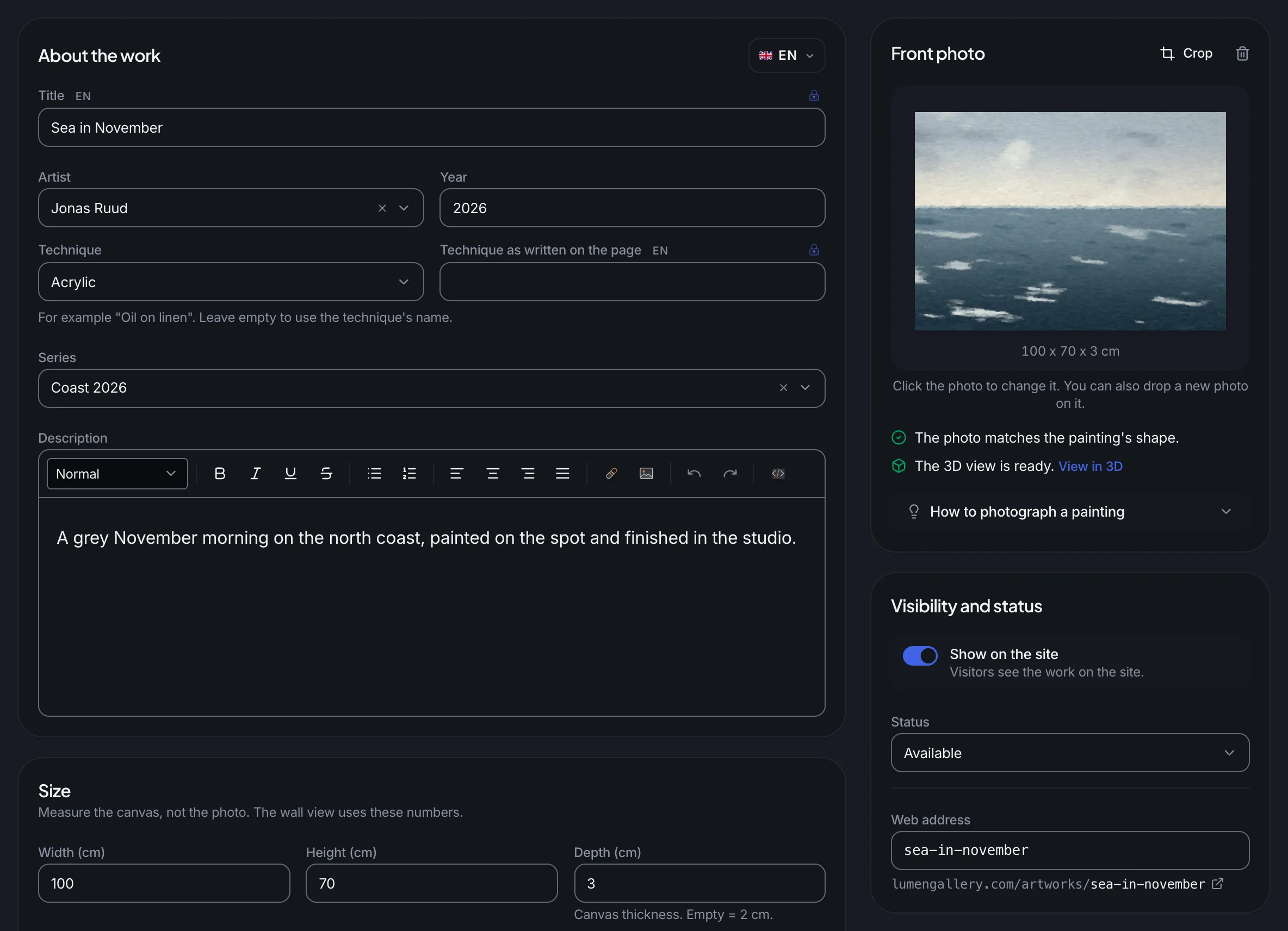
The title, year, technique and description in every language of your site, the size in centimetres, and the frame if the painting is sold with one. Husly makes the 3D file from the front photo and the size by itself, and the Crop button also straightens a painting photographed at a slant.
A gallery picks the artist from its list, and each artist gets a page on the site. A one-artist site does not ask.
On every save Husly makes the work's 3D file at real size from the photo and the size. When the photo does not fit the painting's shape, the admin says so at once.
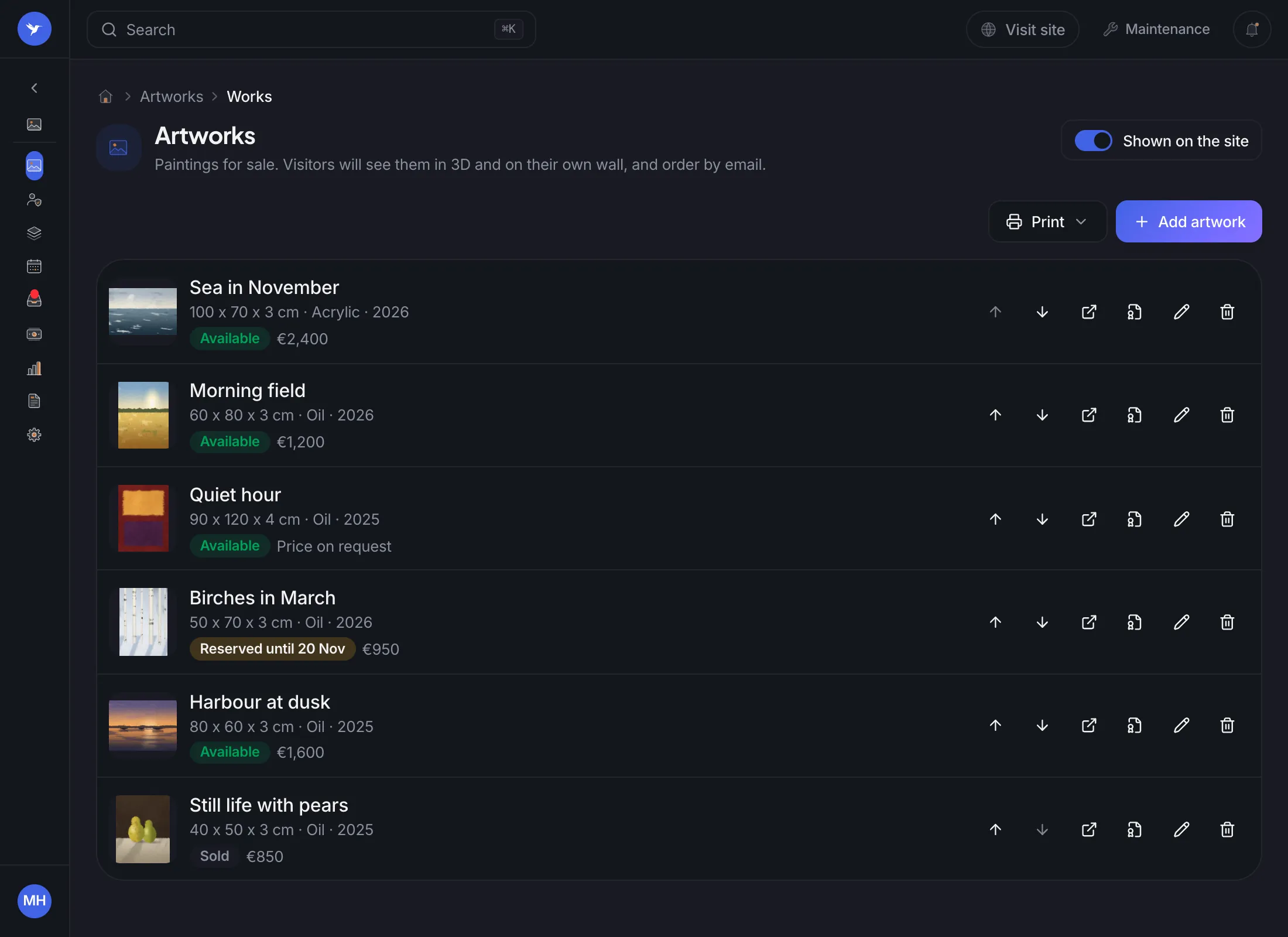
The status shows on the site. A reservation can have a day it lasts until.
Each work with its size, price and status: available, reserved or sold. Set the order with the arrows, and print a certificate, a price list or wall labels.
A PDF for each work with a fixed number, a signature and a QR code. The price list and wall labels come from Print.
Show the price, write "Price on request" or leave it out. The price is never on the picture.
After that day the work goes back on sale by itself, and you get an email.
A sold work stays on the site, marked sold and without its price. Its page has a button to ask about a similar work.
Inquiries and offers
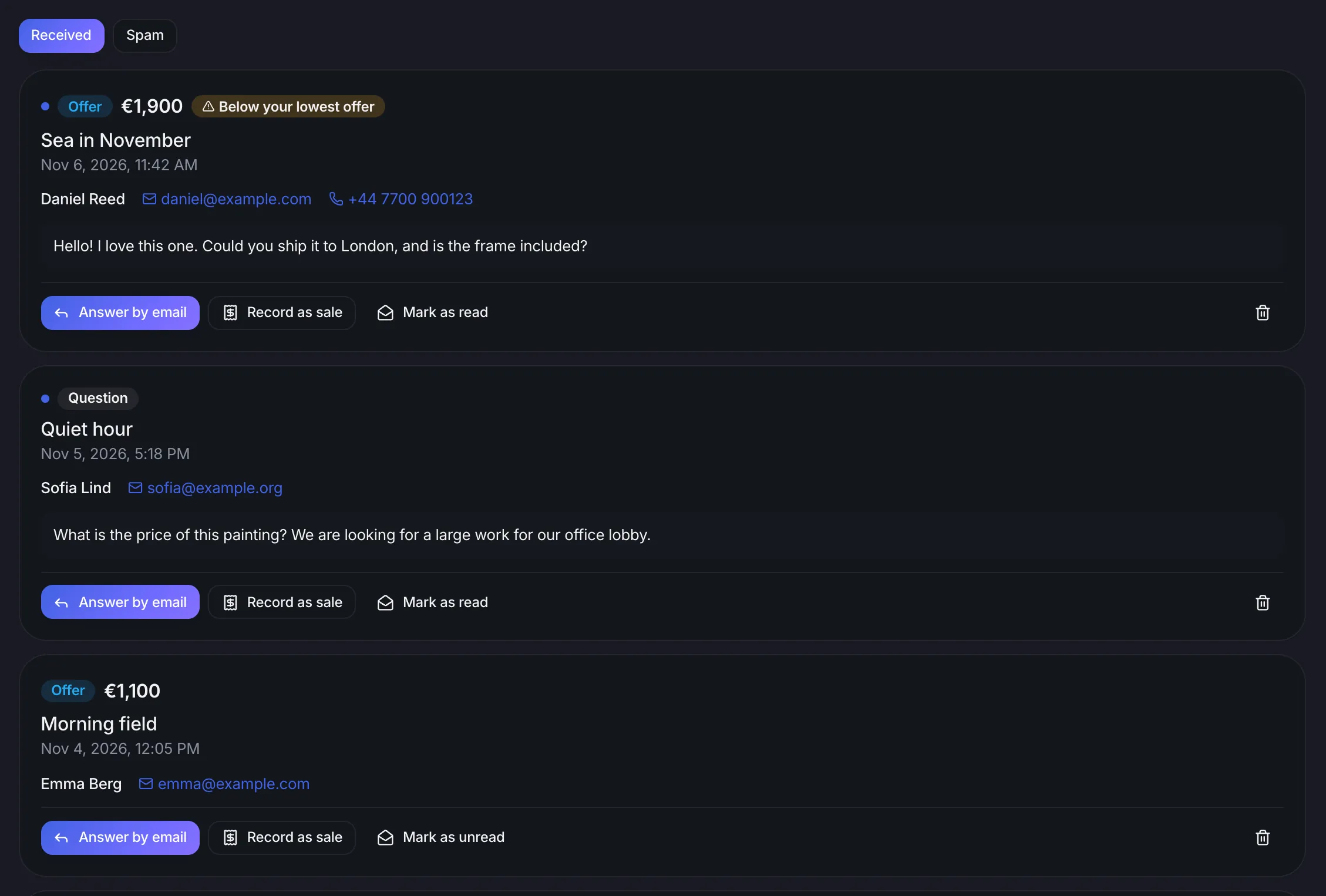
Questions and offers reach your email, the Inquiries tab, the Inbox and Customers. The number of new ones shows in red in the sidebar. You answer by email and record the deal as a sale.
The visitor never sees your lowest offer. When an offer is below it, Husly marks it here and in your email.
One press records the sale and marks the work sold. Sales lists the buyers, the prices and the totals per year.
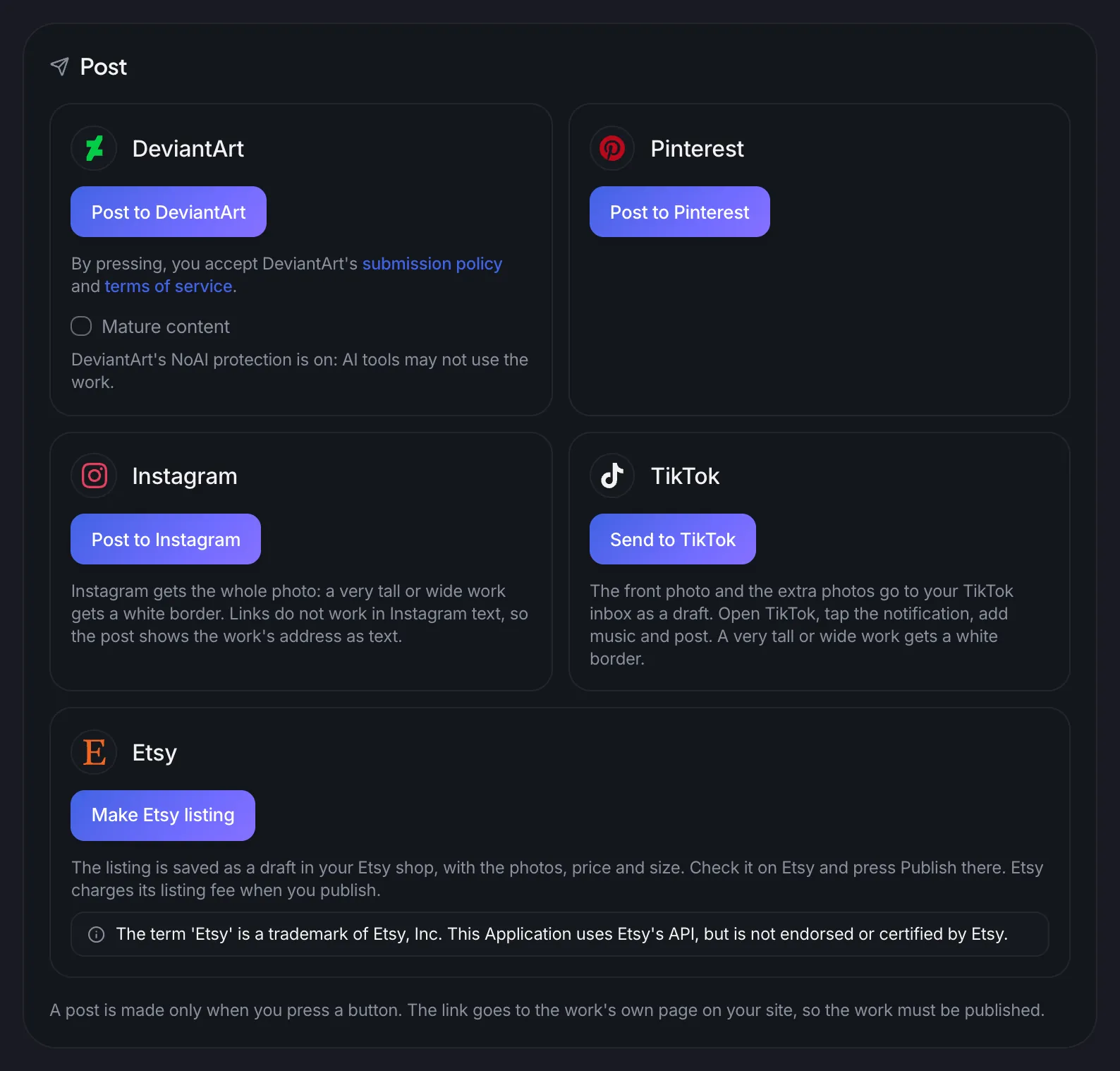
Post a saved work to DeviantArt, Pinterest and Instagram with one press, send it to TikTok as a draft, or make it an Etsy listing. You connect each account once under Integrations.
A work goes to DeviantArt marked as not made with AI, and with the NoAI flag.
The photos, price, size and category go to your Etsy shop. A work sold on Etsy is sold on your site, and a work sold on your site ends its Etsy listing.
A sale does not end with the inquiry. Records, numbers and protection keep the rest in order.
Gallery
In a gallery each artist has a page and a CV. Series group the works, and exhibitions show where a work has been. A one-artist site has its CV on a page of its own.
Sales
The buyer, the price and the day, totals per year and a CSV file. It is a record only, not a payment or an invoice.
Statistics
Each work's views, 3D, wall and room view opens, questions and offers over 30 or 90 days, without cookies.
Shopping catalogues
A product list file whose address you give these services, so your works show in their shopping catalogue.
Protect from AI
One switch tells AI training robots not to read the site and marks every new photo with a data mining refusal. Search engines go on reading the site.
Backups
Works, artists, series and exhibitions are kept in restore points and backups together with your pages.
Artworks is in the Standard plan and every plan above it, from €14 a month. Everything is in: the work pages, 3D, the wall and room views, inquiries, the gallery, posting and statistics.
Husly has no shop and no cart. The visitor asks or makes an offer, you agree with them and send the payment details yourself. You write the delivery and payment text once in the settings, and it shows under every work for sale.
No. Husly makes the 3D file from the front photo and the size by itself, on every save. A good photo is taken in soft light, from a tripod, and cropped exactly to the painting's edges.
On a phone the camera opens and the painting appears on the wall at its real size. On a computer the button shows a QR code to go on with the phone. "My wall" works without the camera too: the visitor picks a photo of their wall, and it stays on their device.
Yes. The choice is under Artworks > Settings. In gallery mode the Artists tab appears, and in the work form you pick the artist from a list.
Yes. Etsy and your site keep the sale in step: a work sold on Etsy becomes sold on your site, and a work sold on your site ends its Etsy listing. So you never sell one painting twice.
The "Protect from AI" switch tells AI training robots not to read the site and marks every new photo with a data mining refusal. Photos uploaded before stay as they are. The switch starts off.
Add a photo, the size and a price, put the catalogue on a page, and visitors can see the painting on their own wall today. Artworks is in the Standard plan and every plan above it.